
A monogrammed towel, a child's name on a backpack, or a wedding gift with coordinated initials can begin as a simple idea. The difficult part starts when the sewist has to choose among built-in machine lettering, downloadable files, subscription libraries, specialty fonts, and the stabilizer and thread needed to make small letters readable.
The right embroidery patterns alphabet resource depends on the embroidery machine, compatible file format, fabric, letter size, desired style, and willingness to edit or test. A built-in alphabet may be the fastest option, while a boutique collection may offer the exact calligraphic look a special project needs. Neither choice matters if the file won't load, the lettering is too small, or the fabric shifts under the hoop.
The resources below compare access, style range, complexity, machine limitations, licensing, and practical support. They also connect the design decision to B-Sew Inn's Baby Lock, Bernina, Bernette, Brother, and Janome machines, embroidery designs, software, thread, stabilizer, in-person classes, service department, and hands-on store demonstrations.
Table of Contents
- 1. Machine Manufacturer Built-In Alphabet Libraries
- 2. Embroidery Design Software Collections
- 3. Free and Freemium Design Collections
- 4. Thread Company Bundled Alphabet Collections
- 5. Subscription-Based Design Services
- 6. Digitizer Specialty Alphabet Collections
- 7. Machine-Specific Proprietary Design Stores
- 8. Stabilizer and Needle Manufacturers' Alphabet Resources
- Embroidery Alphabet Resources: 8-Way Comparison
- Turn a Pattern Choice Into a Successful Project
1. Machine Manufacturer Built-In Alphabet Libraries
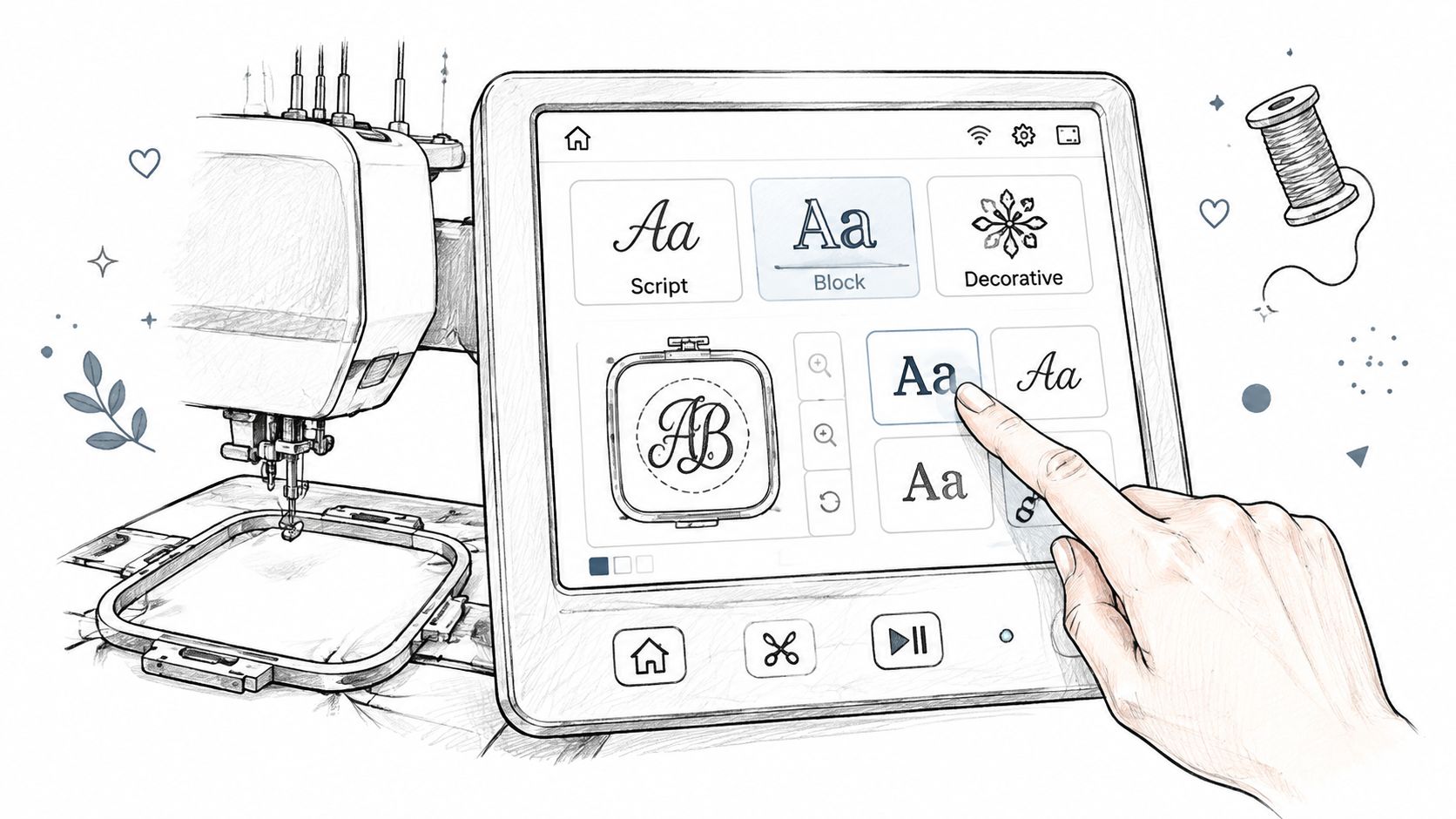
A towel, school bag, or work garment may need a name stitched before there is time to shop for a design file. Built-in lettering is usually the practical starting point because compatible embroidery machines store the alphabet internally. The sewist selects the characters on the machine, sets the layout, and begins without downloading or transferring a separate file.
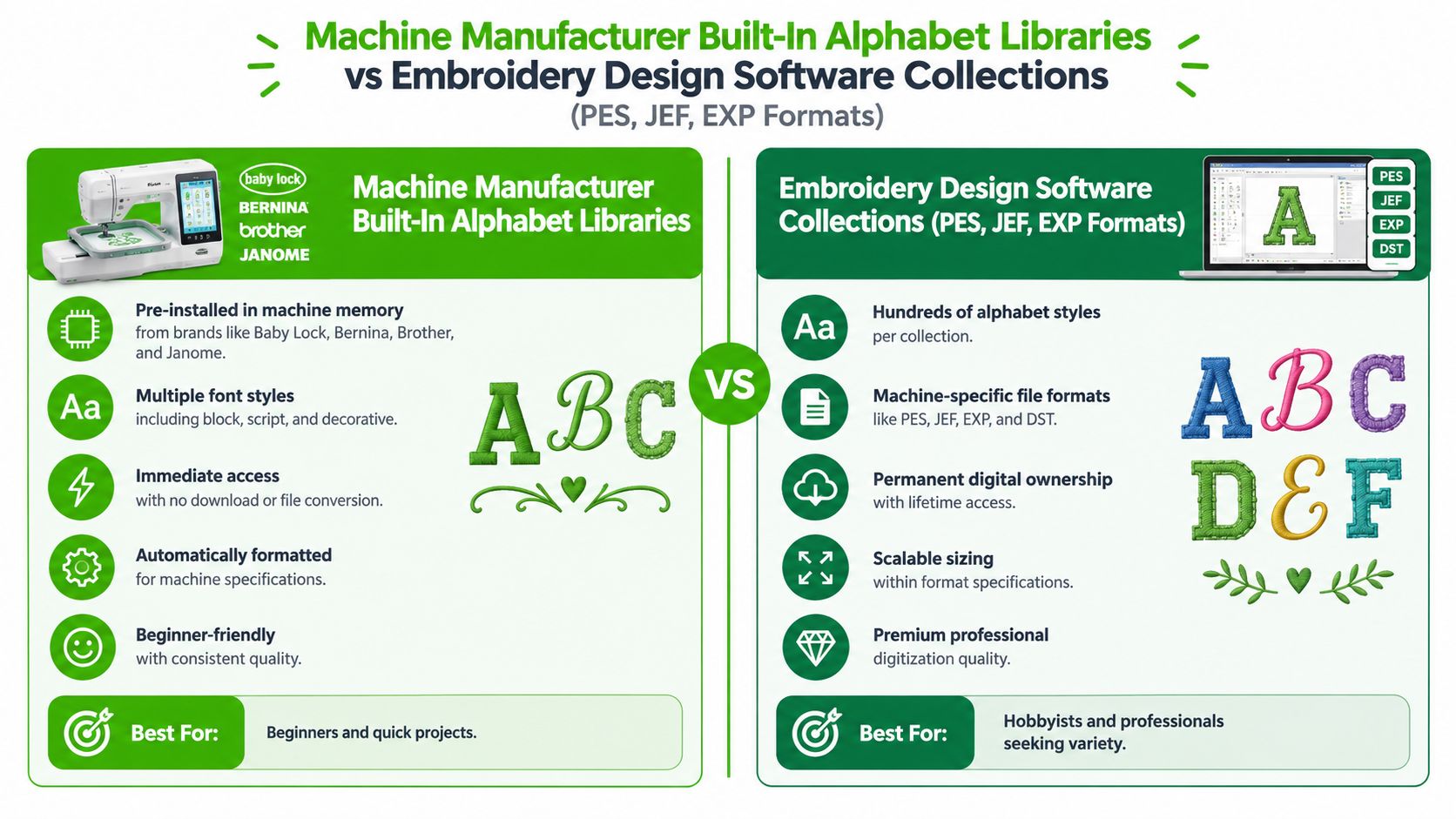
Built-in collections commonly cover block lettering, decorative script, and monogram arrangements. Since the machine already contains the stitch sequence, spacing behavior, and supported size range, setup is simpler and format compatibility is less likely to interrupt the project. The trade-off is a narrower style selection than downloadable alphabet collections.
What built-in lettering handles well
A basic block alphabet suits baby items, school bags, towels, labels, and practical garments. It keeps a first name readable when the project needs clear identification rather than an ornate treatment. Decorative built-in fonts can work for monograms, but very small lettering still depends on fabric stability, thread choice, and the selected stabilizer.
The library may lack a specific vintage, handwritten, international, or highly ornamental style. Test the full built-in selection at the intended size before purchasing outside fonts.
Practical rule: Stitch a sample on the project fabric with the intended thread and stabilizer. The result reveals more than a screen preview.
Model-specific controls may include automatic letter spacing, resizing, color editing, or monogram layouts. A B-Sew Inn machine demonstration or in-person machine mastery session can show how a particular model handles lettering before a purchase or service decision. Carry the sample to class or a service appointment if spacing, hooping, or registration needs hands-on review.
2. Embroidery Design Software Collections
A downloadable alphabet collection becomes useful when a machine's built-in lettering cannot provide the needed style, size, or character set. Commercial files usually come in machine-specific embroidery formats, so confirm compatibility with the exact machine, hoop, and software configuration before purchasing. A matching format alone does not guarantee that the file will load or stitch correctly.
Collections may include formal monograms, vintage-inspired lettering, children's alphabets, numerals, symbols, and coordinated uppercase and lowercase sets. For a wedding gift, one script alphabet could handle initials while a matching numeral set completes the date. The practical trade-off is broader design choice and customization, balanced against file management, licensing limits, and the need to test each font on the intended fabric.
Format is only the first check
The file extension identifies how embroidery software or a machine reads the design. It does not confirm hoop suitability, stitch quality, or performance on a particular fabric. Professional resources may include pre-digitized, resizeable lettering fonts, with character versions prepared for different size ranges and connections designed to support consistent stitching. A technical embroidery font catalog lists more than 50 alphabets and describes recommended size ranges, stitch-length limits, and construction methods such as contour-join and auto-digitizing.
Use a font within its intended size range. Enlarging small lettering can expose gaps and weak connections, while reducing a large decorative character may create dense, crowded stitches. Underlay, thread, fabric weight, stabilizer, and registration all affect the finished letters.
- Confirm the format: Check the machine manual and software requirements before buying.
- Inspect size options: Look for separate files or versions suited to the desired letter height.
- Check licensing: Keep the usage terms with the downloaded files, especially for commercial projects.
- Test the design: Stitch a sample on comparable fabric with the planned thread and stabilizer.
- Organize the library: Label folders by style, format, size, and licensing terms.
B-Sew Inn's in-person classes can help sewists load, sort, edit, and combine files. Bring a test sample to class or service support when spacing, hoop placement, or registration still needs hands-on review.
3. Free and Freemium Design Collections
Free and low-cost downloads let sewists test an embroidery patterns alphabet style before committing to a larger library. A seasonal alphabet may suit a holiday towel, while a playful set can work for a child's project. A trial font also gives you a practical way to judge stitch quality, spacing, and editing needs before using the style repeatedly.
The trade-off is uneven file quality. Community-created and promotional designs may stitch cleanly, but some contain unstable satin columns, excessive jumps, poor registration, or awkward spacing. A polished thumbnail cannot show how the lettering will behave on your fabric, stabilizer, and machine.
Treat every free file as a test file
Start with one or two representative letters, then stitch them on the same fabric and stabilizer planned for the project. Inspect the front for gaps, distortion, fabric pull, and uneven columns. Check the reverse for thread buildup, long jumps, and loose connections. If the collection includes several sizes or formats, test the version that matches your machine and intended letter height.
Licensing affects how the design can be used. Personal projects may be permitted while selling finished items is restricted. Terms may also prohibit sharing or redistributing the original files. Save the download page, format, and license beside the design so the usage conditions remain clear.
- Read the comments: Feedback may identify loading errors or weak digitizing.
- Record the source: Keep the file origin and format with your library.
- Check stitch behavior: Dense or poorly connected letters can reveal problems early.
- Avoid bulk purchases: One successful sample does not confirm that every character performs equally well.
Free resources suit experimentation and practice. Repeated names, customer orders, and coordinated product lines usually justify a professionally digitized collection with documented sizes and settings. A B-Sew Inn class can help organize files and test a design before a free-download folder becomes difficult to manage.
4. Thread Company Bundled Alphabet Collections
Some thread purchases include access to coordinated embroidery designs or alphabet collections. The practical benefit is a related thread line, color guide, and lettering style, which can simplify matching monograms for baby gifts, linens, clothing, or decorative sets.
A bundled alphabet may contain script letters, embellishment motifs, and decorative characters designed to show a thread palette. Rayon and polyester create different surface effects. Metallic and specialty threads may require adjustments to needle choice, sewing speed, and tension.
Match the design to the thread system
A color chart cannot predict the stitched result. Thread weight, needle size, stabilizer, fabric weave, and machine settings all affect letter quality. A smooth satin-stitch letter may pucker on lightweight knit fabric if the stabilizer does not support it adequately.
B-Sew Inn carries embroidery thread and related supplies from established brands. Associates can help connect a bundled design offer with the thread, needle, and stabilizer in the project plan. The thread and embroidery supplies selection can help sewists compare colors and supporting materials before assembling a coordinated gift set.
Test the lettering on the actual fabric and stabilizer before stitching the full project. Check narrow columns, curves, and decorative flourishes for gaps, excessive density, fabric pull, or thread buildup on the reverse.
- Keep the color guide: It helps reproduce a palette across multiple projects.
- Verify the needle recommendation: Specialty threads may need a different needle than standard polyester.
- Test decorative elements separately: Flourishes can add density beside already-heavy letters.
- Check access terms: Download instructions may depend on registration or a purchase code.
A class focused on thread selection and color coordination can help when the alphabet is only one part of a larger design. The strongest result comes from balancing contrast, stitch weight, and fabric stability, rather than choosing the brightest spool.
5. Subscription-Based Design Services
Subscription libraries fit sewists who use new lettering styles regularly and want professionally digitized files added over time. Releases may include seasonal alphabets, handwritten scripts, calligraphy, heritage-inspired styles, and coordinating motifs.
The recurring commitment requires a clear use case. A subscription may make little sense for one monogram, while a small embroidery business, gift maker, or active hobbyist may repeatedly need names, initials, and themed lettering.
Judge the service by the projects it supports
Archive size is only one consideration. Check whether the service supplies the machine format you use, includes the letter combinations required for your projects, keeps files available after cancellation, and permits commercial use of finished items. Those terms can determine whether an apparently affordable collection remains useful.
File management also becomes part of the job. Downloading each release without a naming system makes it harder to locate the correct size or format when a project is ready for the machine. Save files by alphabet name, size, format, and collection, then keep a second copy on external storage.
A trial should involve representative letters, including curves and narrow characters. Stitch them on the intended fabric and stabilizer before relying on the collection for a finished item. This test reveals whether the lettering's density, spacing, and thread coverage suit the project.
Software can help adjust spacing after the files are imported. General embroidery software documentation explains that overall spacing may be changed on-screen, while individual letter spacing can be calculated as a percentage of letter height. In fixed-spacing mode, a higher stitch-spacing value produces more open stitching and lower density, as described in Wilcom's embroidery software documentation.
Before subscribing, compare the recurring fee with the standalone collections you would purchase. Confirm the license before selling finished goods, and download only files that match your machine and upcoming work.
B-Sew Inn's in-person software and machine classes can help turn a large subscription library into aligned, tested names rather than an unmanaged folder of designs. Hands-on support is especially useful when file conversion, placement, or machine compatibility affects the next purchase or service decision.
6. Digitizer Specialty Alphabet Collections
Boutique digitizers suit sewists who need a distinct visual style rather than a generic alphabet. Collections may center on vintage lettering, minimalist shapes, handwriting, calligraphy, international scripts, or decorative flourishes. Some include matching frames and embellishments; others focus on particular monograms or letter combinations.
Choose this source for a wedding monogram, heritage garment, small product line, or personalized gift where lettering carries much of the design. The trade-off is narrower coverage. A specialty set may provide fewer characters, sizes, or usage instructions than a broad commercial library, so confirm the complete character set before purchasing.
Look beyond the preview image
Review the digitizer's samples for smooth curves, clean joins, and consistent character construction. Stitching notes can be just as useful. They may specify suitable fabrics, stabilizer, intended letter size, thread requirements, and whether the files are meant for a particular hoop or machine format.
Small lettering needs careful testing. Guidance for fine embroidery identifies 3/16 inch as a minimum height for legible stitching and recommends about 1/8 inch between letters. These measurements appear in practical small-lettering guidance, but results still vary with the font, fabric, thread, stabilizer, and machine.
Small lettering exposes every weakness. A graceful script at a larger size can become a closed, crowded shape after reduction.
Check whether the purchase contains an editable embroidery font or separate stitch files. An editable font lets software combine letters, adjust spacing, and center a name. Individual files require manual placement and may be harder to reshape for a fixed hoop. Confirm file formats, machine compatibility, and licensing before buying, then test representative letters on the intended fabric.
For detailed decorative work, B-Sew Inn classes offer hands-on help with positioning, density, stabilizer preparation, and machine settings. That support can determine whether a specialty collection needs software work, a different stabilizer, or a service appointment before the finished project begins.
7. Machine-Specific Proprietary Design Stores
Official design stores connected to major embroidery machine brands carried by the retailer provide alphabet resources organized around particular machine families. Collections may be grouped by hoop capability, design theme, or machine features. Some compatible machines also support transfers through connected software or cloud-based workflows.
The main benefit is lower compatibility risk, but checking remains necessary. A design made for one machine line may not suit another model's hoop size, file handling, or wireless functions. File availability does not guarantee that the complete workflow will work on the machine you own.
Test the workflow before buying
Cloud transfer can save steps when the machine, network, account, software, and design service are configured together. USB transfer may be a better fit for sewists who prefer local file storage or work without a connected setup. Choose the collection around the transfer method you will use.
Before purchasing, check:
- Machine compatibility: Confirm the exact model, not only the manufacturer.
- Hoop requirements: Verify that each intended letter size fits your available hoop.
- Transfer method: Identify whether the files use USB, direct connection, or a supported cloud workflow.
- Account access: Keep purchase records and download instructions.
- Usage rights: Review personal and commercial permissions.
Test a representative design before committing to a larger collection. Confirm that the file transfers, opens correctly, fits the hoop, and stitches cleanly on the intended fabric. A store demonstration can help clarify these steps. At a B-Sew Inn location, sewists can bring workflow questions and observe how a compatible machine handles lettering and file transfer. That hands-on check may reveal a file, software, storage, or machine-setting issue before a project is underway.
The purchase also affects future support. Repeated transfer errors, unreadable media, or placement problems may call for a service appointment or machine mastery session. A technician can help determine whether the cause is the design file, software, storage device, or machine settings.
8. Stabilizer and Needle Manufacturers' Alphabet Resources
Stabilizer and needle manufacturers usually support the stage after font selection. Their guides help diagnose letters that ripple, sink into fabric, or lose clarity. The useful variables are stabilizer type, needle selection, fabric behavior, thread, and lettering size. Together, these resources turn a downloaded alphabet into a controlled stitch-out rather than a guess.
A tear-away stabilizer can suit a stable woven fabric. A cut-away support often gives a knit continuing structure during and after stitching. Lightweight garments, towels, and textured fabrics may require different support again. Choose from the fabric and design, not from a universal stabilizer rule.
Treat the first stitch-out as a technical test
Small letters need firm support and a sharp needle suited to the thread and fabric. Larger decorative alphabets can tolerate more visual texture, but dense areas may create substantial stitch volume. An embroidery stitch calculator estimates that a 1-square-inch solid area at standard 90 density contains about 2,000 stitches. Simple text or monograms under 2 inches commonly fall in the 1,000 to 4,000 stitch range. Underlay may add approximately 10% to 15%, and each color change can add roughly 250 stitches.
These figures are estimates, not the design file's actual stitch count. They still explain why a dense alphabet may need stronger support, slower stitching, or a less demanding fabric. Check the file's stitch count before choosing thread, hooping the project, or committing to a garment.
- Hoop smoothly: Remove wrinkles and avoid loose fabric so the baseline stays straight.
- Match the support: Test tear-away and cut-away options on the actual fabric.
- Use the needle chart: Choose a needle beyond a basic embroidery type when thread weight or fabric requires it.
- Check the underside: Excess bobbin buildup can indicate density, tension, or stabilizer trouble.
- Record successful settings: Note the needle, thread, stabilizer, hooping, and machine settings for repeat work.
B-Sew Inn's in-person technique classes connect these decisions to real machines, needles, thread, stabilizer, and hooping practice. Hands-on guidance can identify whether a weak result comes from the alphabet file, fabric, needle, tension, or support. If the test still fails, change one variable at a time before buying another collection or arranging machine service.
Embroidery Alphabet Resources: 8-Way Comparison
| Item | Core Features | Quality & Ease (★) | Value / Price (💰) | Target Audience (👥) | Unique Selling Points (✨ / 🏆) |
|---|---|---|---|---|---|
| Machine Manufacturer Built-In Alphabet Libraries | Pre-installed fonts, machine-optimized sizes & spacing | ★★★★, plug-and-play, consistent | 💰 Free with machine | 👥 Beginners, in-store demos, quick projects | ✨ Immediate access, guaranteed compatibility; 🏆 reliable stitch results |
| Embroidery Design Software Collections (PES, JEF, EXP) | Hundreds of machine-specific files, permanent ownership | ★★★★★, professional digitizing, high-quality | 💰 One-time purchase (varies by pack) | 👥 Hobbyists & professionals needing variety | ✨ Vast selection & commercial-grade digitizing; 🏆 premium results |
| Free & Freemium Design Collections | Community & trial alphabets, varied formats | ★★–★★★, variable quality, needs vetting | 💰 Free / low-cost trials | 👥 Budget hobbyists, experimenters | ✨ Risk-free testing; good for trends & trials |
| Thread Company Bundled Alphabet Collections | Fonts bundled with premium thread, color-coordinated | ★★★★, optimized for thread properties | 💰 Included with thread purchase | 👥 Customers buying premium threads, gift makers | ✨ Color-coordinated alphabets; 🏆 manufacturer-optimized stitching |
| Subscription-Based Design Services | Monthly releases, unlimited downloads while active | ★★★★, fresh content, requires management | 💰 Recurring ($8–$20+/mo) | 👥 Power users, studios, trend-followers | ✨ Continuous new releases & archives; cost-effective for high use |
| Digitizer Specialty Alphabet Collections | Artist-led boutique fonts, custom commissions | ★★★★★, unique artistic quality | 💰 Premium per-design (often moderate) | 👥 Designers, bespoke project makers | ✨ Distinctive aesthetics & custom options; 🏆 artisanal detail |
| Machine-Specific Proprietary Design Stores | Brand-curated alphabets, cloud sync, software integration | ★★★★, seamless brand integration | 💰 Higher price points / brand discounts | 👥 Brand owners, cloud-capable machine users | ✨ Wireless transfer & brand-optimized designs; 🏆 guaranteed fit |
| Stabilizer & Needle Manufacturers' Resources | Technical guides, needle/stabilizer charts & demos | ★★★★, essential for stitch success | 💰 Free guides (product purchase recommended) | 👥 All embroiderers seeking reliability | ✨ Practical compatibility guidance; 🏆 foundational for quality results |
Turn a Pattern Choice Into a Successful Project
The best alphabet resource is the one that fits the entire project, not merely the one with the most attractive preview. A sewist making a single child's name may be perfectly served by a built-in machine alphabet. A maker producing coordinated wedding gifts may need a downloadable collection with multiple sizes, matching numerals, and software that can center and combine letters. A specialty designer may be the right choice for a calligraphic monogram, provided the collection includes the required characters and the machine can handle the file.
Start with compatibility. Confirm the exact machine model, supported file format, hoop dimensions, design size, and transfer method. PES, JEF, and EXP are not interchangeable labels, and a file that loads successfully can still be unsuitable if its stitch construction exceeds the fabric or hoop's practical limits.
Licensing should be checked before a design appears on products offered for sale. Personal use and commercial use may have different permissions, and subscription files may have separate rules for access after cancellation. Save the license information with the design so future projects don't depend on memory.
Testing should follow before production stitching:
- Load the correct file: Verify the format and confirm that every letter appears correctly.
- Choose the support: Match stabilizer to the fabric, alphabet size, and stitch density.
- Select the needle and thread: Use the manufacturer guidance as a starting point, then test.
- Stitch a sample: Use comparable fabric and the same hooping method.
- Inspect the result: Look for gaps, puckering, closed counters, excess density, and uneven registration.
- Adjust the layout: Use compatible software when letter spacing, baselines, or centering need refinement.
Lettering software can make spacing adjustments more controlled, but software won't repair a poorly digitized file. Likewise, a premium alphabet can't overcome loose hooping or inadequate stabilizer. The finished quality comes from the interaction between the design, machine, materials, and operator.
B-Sew Inn provides machines from Baby Lock, Bernina, Bernette, Brother, and Janome, along with embroidery designs, software, thread, stabilizer, needles, notions, cabinets, and cutting tables. Readers can visit stores in Tulsa and Oklahoma City, Oklahoma, Springfield, Missouri, Humble, Texas, and Fayetteville, Arkansas to see and test machines in person. A machine mastery session, technique class, or service appointment can be the most efficient next step when a lettering project repeatedly fails for reasons that aren't obvious on screen.
B-Sew Inn offers embroidery machines, alphabet-focused design collections, software, thread, needles, and stabilizer for projects ranging from simple names to detailed monograms. Visit B-Sew Inn to browse available resources, arrange hands-on machine time at a store, book an in-person class, or contact the team for service and file-format guidance.

